
Video content in 2026 is booming. From YouTube and TikTok to Instagram Reels, online courses, and ads, everyone is creating video. But editing can be a challenge, even for experienced creators. If you’re searching for how to choose best AI video editor 2026, you’re likely comparing tools to find one that saves time, improves quality, and fits your workflow. Not every AI video editor is worth the investment, so it’s smart to do your research before subscribing or buying.
In this guide, we’ll cover everything you need to know:
- What an AI video editor does: Automates editing tasks like trimming, transitions, captions, and even visual effects.
- Key features to look for: Ease of use, templates, rendering speed, AI-powered enhancements, and multi-format exports.
- Software comparison: Side-by-side look at popular free and paid AI editors, highlighting strengths and limitations.
- Free vs paid options: Learn which tools give the best value depending on your content needs.
- Final recommendation: Guidance based on your goals, workflow, and budget so you can pick the right tool.
By understanding the features that matter and comparing options carefully, you’ll save time, reduce frustration, and create professional looking videos faster. Whether you’re producing short social clips or full length courses, this guide helps you choose best AI video editor app and you can also learn more about iPhone best apps too. Which will fits your needs and maximizes your content potential. Let’s dive in and find the perfect AI editing tool for you.
What Is an AI Video Editor?
An AI video editor is software that uses artificial intelligence to make video editing faster and simpler. Instead of spending hours manually cutting clips, adding captions, removing silence, or adjusting colours, AI handles these tasks automatically.
Common features include:
- Automatic scene detection for smoother cuts
- Auto subtitles and captions for accessibility
- Background noise removal for clear audio
- Smart transitions between clips
- Text to video creation for quick content
- AI generated editing suggestions to speed up workflow
By automating repetitive or technical tasks, an AI video editor saves time and reduces the learning curve for beginners and busy creators alike.
If you want to choose best AI video editor 2026, it’s important to understand these core features. Knowing what an AI editor can do helps you pick a tool that fits your content style, workflow, and production needs, so you can focus on creating instead of struggling with editing.
Key Features to Look For
Before you subscribe, know how to choose best AI video editor 2026 by evaluating these critical features that impact speed, quality, and ease of use.
1. Automatic Editing Capabilities
One of the most useful things to check when you choose best AI video editor 2026 is its automatic editing features. These tools save time by handling tasks you would normally do manually.
Look for features like:
- Auto cut silence – Removes pauses automatically for smoother videos.
- Smart clip trimming – Cuts unnecessary parts without affecting flow.
- AI highlight detection – Finds the most important moments in your footage.
- One-click editing – Lets you create a finished video quickly with minimal effort.
For YouTubers, online educators, or social media creators, these automatic editing capabilities can save hours of work. Instead of manually reviewing every clip, AI does the heavy lifting, letting you focus on content, storytelling, and publishing. Choosing an editor with strong automation ensures faster production and more consistent results, making it easier to produce high-quality videos regularly.
2. AI Subtitles & Captions
In 2026, adding captions to your videos is no longer optional it’s essential. If you want to choose best AI video editor 2026, make sure it includes accurate and easy-to-use subtitle tools.
Look for an editor that can:
- Generate accurate subtitles automatically, saving hours of manual work.
- Support multiple languages for wider audience reach.
- Allow easy styling so captions match your video’s look and feel.
Captions don’t just help accessibility they boost engagement too. Studies show videos with captions can increase viewer retention and engagement by up to 40% on social platforms like YouTube, Instagram, and TikTok. By picking an AI video editor with strong subtitle and caption features, you ensure your content is clear, professional, and reaches more viewers. This makes it easier to produce high-quality videos quickly while growing your audience.
3. Ease of Use
If you’re just starting out, ease of use is one of the most important factors when you choose best AI video editor 2026. A beginner friendly editor can save time, reduce frustration, and help you create professional-looking videos quickly.
Look for features like:
- Drag-and-drop interface – Makes adding clips, images, and effects simple.
- Pre-made templates – Ready-to-use layouts for intros, transitions, and social media formats.
- Beginner tutorials – Step-by-step guides or video walk through to help you learn the tool fast.
The best AI video editor for beginners should feel intuitive, not overwhelming. You shouldn’t need a steep learning curve to start producing quality content. Choosing a tool that combines automation with simplicity ensures you can focus on your creativity, storytelling, and building an audience instead of struggling with complex editing software.
4. Export Quality & Formats
When you choose best AI video editor 2026, export quality and format options are essential. Your finished video needs to look professional and be compatible across platforms like YouTube, TikTok, Instagram, or online courses.
Look for these key features:
- 4K export support – Ensures your videos stay sharp and high-quality, even on large screens.
- No watermark (or minimal watermark in free plans) – Keeps your videos clean and professional.
- Multiple aspect ratios – Support for 16:9, 9:16, 1:1, and other formats makes your content ready for any platform.
These options are especially important for creators who publish across multiple channels. A flexible AI editor lets you produce high-quality videos without extra software or manual conversions. Choosing a tool with strong export capabilities ensures your content looks polished, professional, and audience-ready every time.
5. Pricing & Scalability
When you choose best AI video editor 2026, consider cost and growth potential. Check if there’s a free plan and what limitations it has. Evaluate whether premium features are worth the price and if the tool can scale as your content grows.
Some editors may seem affordable initially but restrict exports, AI credits, or advanced features. Choosing a scalable editor ensures you can create more videos, handle larger projects, and continue improving your content without switching tools frequently. Balance budget with functionality for long-term efficiency.
Best AI Video Editors Compared (2026)
Here’s a practical AI video editing software comparison of top tools creators are using in 2026.
1. Descript
This AI video editor is perfect for pod casters, YouTubers, and educators who want to save time while producing professional content. It works by letting you edit videos as easily as editing text cut out mistakes, filler words, or pauses in seconds. You can also use features like AI voice cloning to add narration or replace audio without re-recording. These tools automate tedious editing tasks, helping you focus on content and storytelling rather than spending hours trimming clips manually.
By choosing this tool, you can drive better results quickly. Auto removal of filler words, smart scene detection, and text based editing make your workflow faster and more efficient. While the free version limits exports, upgrading unlocks full capabilities, letting you create polished videos consistently. If you want to choose best AI video editor 2026, this software is a strong option that combines simplicity, speed, and professional-quality results, making it ideal for growing creators and educators.
2. CapCut
CapCut is ideal for short form content creators who want to produce eye catching videos quickly. It uses powerful AI driven editing tools to automate tasks like trimming, transitions, and effects, making it easy to create polished videos without spending hours in the editor. With trending templates and smart suggestions, you can stay on top of social media trends while saving time.
The app also shines in mobile editing, allowing you to work on videos anytime, anywhere. While some advanced features are limited to the pro version, the free tools are strong enough for most creators. If you want to choose best AI video editor 2026, CapCut is a solid choice for fast, professional-looking videos, especially for TikTok, Instagram Reels, or YouTube Shorts. Its combination of automation, templates, and mobile flexibility makes it perfect for creators focused on short-form content.
3. Runway
Runway is a powerful tool designed for advanced creators who want to explore AI-driven visuals and professional effects. It offers features like AI video generation, background removal, and advanced visual effects, making it perfect for producing high-quality content quickly. This editor is ideal if you want to choose best AI video editor 2026 that can handle complex projects and creative workflows.
While Runway delivers professional results, beginners may face a learning curve due to its advanced features. However, once you get familiar with its tools, you can create stunning videos with minimal manual effort. Its AI capabilities save hours of editing while allowing full creative control, making it a top choice for creators focused on high-end visuals, special effects, or AI-enhanced storytelling.
4. Pictory
Pictory is ideal for creators who want to turn written content into engaging videos quickly. It excels at converting blog posts, articles, or scripts into video format using AI, making it perfect if you want to choose best AI video editor 2026 for content re purposing. Automatic summation and smart scene selection help you create concise, polished videos without spending hours editing.
Its simple workflow makes it accessible for beginners and busy creators, allowing you to produce videos efficiently. However, Pictory offers limited creative control compared to more advanced editors, so it’s best suited for straightforward, content-focused projects. If your goal is to transform text-based content into video quickly while saving time, Pictory is a strong choice that balances speed and automation for effective results.
5. In Video
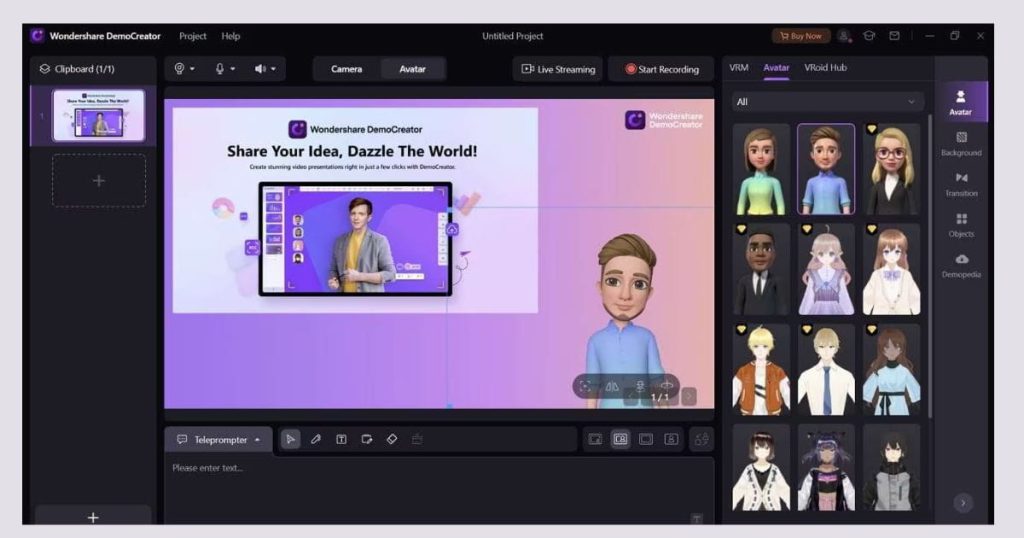
In Video is perfect for marketers, small business owners, and creators who want to produce professional looking videos quickly. It offers ready-made templates for ads, an AI script generator, and easy customization, making it a strong option if you want to choose best AI video editor 2026 for marketing and business content.
While the free plan adds a watermark, the paid version unlocks full features and higher export quality. Its user-friendly interface allows even beginners to create engaging promotional videos, social media ads, or presentations efficiently. If your focus is business or marketing videos, In Video combines speed, automation, and flexibility to help you produce polished content without extensive editing experience.
Free vs Paid AI Editors
| Feature | Free AI Editors | Paid AI Editors |
|---|---|---|
| Watermark | Often yes | Usually no |
| Export Quality | Limited | Full HD / 4K |
| AI Credits | Restricted | Higher limits |
| Templates | Basic | Advanced & premium |
| Support | Community | Priority support |
When Free Is Enough:
Free AI video editors are perfect if you’re just testing a platform, creating casual content, or producing short-form clips for social media. They give you a chance to explore features and understand the workflow without spending money. For beginners or hobbyists, free tools can handle basic trimming, captions, and templates efficiently. While limited in exports or advanced effects, these editors are enough to start learning, experiment with AI-powered editing, and decide which features matter most when you later choose best AI video editor 2026.
When Paid Is Worth It:
Investing in a paid AI video editor makes sense if you run a monetized YouTube channel, handle client work, or create business marketing content. Paid versions unlock high-quality exports, advanced AI features, more templates, and multi-platform formatting. For creators serious about growing their audience and producing professional content consistently, premium tools save time, reduce workflow friction, and improve video quality. If you want to scale your content in 2026, choosing a paid editor is often a smart long-term investment.
If you’re serious about content growth in 2026, investing in a premium AI video editor often pays off quickly.
How to Choose Based on Your Goal
Picking the right AI video editor depends on your content type, goals, and experience. If you want to choose best AI video editor 2026 for your needs, here’s a quick guide:
- Beginner YouTuber: CapCut or Descript are ideal for easy editing, templates, and automatic features.
- Blogger converting articles to video: Pictory excels at turning text into engaging videos quickly.
- Advanced creator: Runway provides advanced AI visuals, background removal, and professional effects.
- Business or marketing videos: In Video offers templates, AI script generators, and branding tools.
- Podcasts or audio-driven content: Descript simplifies editing by letting you edit video as easily as text.
By matching your content type and skill level with the right tool, you can save time, improve video quality, and grow your audience efficiently. Choosing the right editor ensures your workflow is smooth and productive while creating professional videos consistently.
Final Recommendation
If you’re wondering how to choose best AI video editor 2026, the truth is there’s no single “best” tool. The best editor is the one that fits your workflow, content type, and goals. Start by trying a free trial, testing editing speed, checking export quality, and comparing AI automation features. Focus on tools that save you time, improve video quality, reduce editing stress, and can grow with your channel.
The right AI video editor helps you create professional content consistently without spending hours on manual edits. In 2026, creators who leverage AI effectively will have an edge on platforms like YouTube, TikTok, and Instagram.
Don’t just choose a popular tool choose the one that makes your videos faster, cleaner, and more engaging. By picking the right editor for your needs, you’ll boost productivity and produce content your audience loves.
FAQs
1. What is the best AI video editor for YouTube in 2026?
CapCut and Descript are top choices for YouTube creators because they combine powerful automation with an easy-to-use interface, helping you edit videos quickly, remove filler content, and produce professional-quality results without spending hours on manual editing.
2. Are free AI video editors good enough?
Free versions work well for beginners, but serious creators often upgrade to access higher quality exports, advanced features, and remove watermarks, ensuring their videos look professional and are ready for monetization or wider distribution.
3. Which AI video editor is best for beginners?
CapCut and In Video are ideal for beginners, offering intuitive interfaces, ready-made templates, and automated editing features that make it easy to create polished videos quickly without a steep learning curve.
4. What is automatic video editing AI?
It’s software that automatically trims clips, adds captions, removes silence, applies transitions, and enhances video quality, helping creators save time and produce polished, professional-looking content without manually editing every detail.
5. Are paid AI video editors worth it?
If you monetize your content or produce videos regularly, investing in premium AI editors often delivers a better return, offering higher quality exports, advanced features, and faster workflows that save time and boost productivity.

Leave a Reply